
Documents and certificates
You can find your reregistration request in the left-hand panel of the self-service portal. Your documents are stored with your reregistration request for each semester.
As soon as you have completed all requirements for reregistration, including the payment of your fee for the current semester, the status of your reregistration will change to "approved". After that you will be able to view and download all your documents under the “Documents” tab.
The documents will be stored and can be accessed at any time.
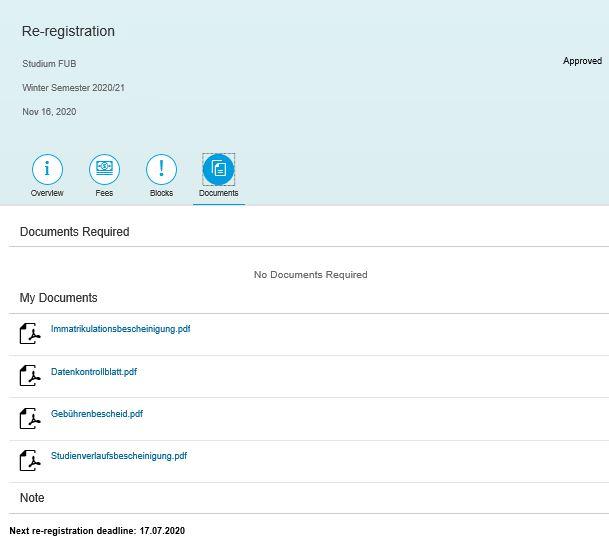
If you are enrolled for your first semester at Freie Universität Berlin, the above-mentioned documents can be found with your enrollment application. From your second semester onward, they are stored with your reregistration for each semester.
You can download all certificates of enrollment free of charge, starting from the 2020 summer semester.
In case you did not save the certificates of the 2020 summer semester and 2020/2021 wintersemester you can click on "create request" and then select "past enrollment certificates" and choose the relevant semester.
If you require a different certificate (from even earlier semesters), you can request this certificate for a fee. For more details, take a look at the individual certificates.
Certificates of academic progress or payment receipts of previous semesters will be available free of charge as well. To receive a copy of these documents, please contact info-service@fu-berlin.de.
If you are unable to download a certification via the self-service portal because it refers to a semester before summer semester 2020 or because you had an interruption of your studies due to a deregistration, we will be happy to issue you a replacement copy. There is a fee for this service. To request one, click on “Create request” in the self-services portal and then select “Replacement Certificates/Replacement Campuscard” from the drop-down menu. In the next drop-down menu select “Other/individual certificates (fees charged)”. Please provide as much detail as possible about what the certificate is for and what it needs to say in the free text field. You can then submit the request.
Please do not submit a request for an individual transcript of records! The Student Records and Registration Office is not authorized to issue certificates regarding performance. Please contact the appropriate examination office.
Once you have submitted the request, you will see it under “Replacement Certificates/Replacement Campuscard” in the left-hand panel. Open the link and be sure to check the information under “Fees.” There you will find the relevant information for making a payment via bank transfer including your individual personal transaction purpose code (“Verwendungszweck”).
Please note:
Certificates and/or confirmation letters in relation to official forms – for example, forms required for BAföG, the tax office, child benefit payments, survivor's pension for orphans, etc. – will not be issued separately. You should use your current enrollment certificate, which you can download from the self-services portal.
The electronic certificate can be verfied with a stamp from the Student Administration Office.
Trans*, inter* and non-binary students can decide for themselves which name appears on the documents issued by the FU. There is a simple request procedure for this, see Changing personal data.
The Students Administration Office can verify a document or certificate by adding an official stamp. Please contact bescheinigungen@studium.fu-berlin.de and write in the subject line "stamp".