
Formulating search queries
In the simple search, you can search by author, title, publisher, year of publication, call number, notation, ISBN, etc. Primo also searches abstracts and full texts, if available.
Multiple search terms are automatically combined with AND. An AND operator means that all terms (and numbers, if applicable) must appear in the description text, abstract, title, or in the retrieved document.
- Example: bergson materie 1908

Using Boolean or Logical Operators, two or more search terms can be related to each other. Operators that can be used are AND, OR, and NOT (in capital letters), or UND, ODER, and NICHT. If no operator is specified, an AND operator is performed.
- Example: populism OR populismus

The OR/ODER operator increases the number of hits. Titles containing either one or the other term, or both, are found.
- Example: ernest hemingway NOT man sea

The NOT/NICHT operator excludes search terms from the search. In this example, the search terms Ernest and Hemingway are searched for, but not man and sea. Primo therefore interprets the search query as follows: (ernest AND hemingway) NOT (man AND sea). The search engine automatically inserts parentheses for two terms without an operator.

Wildcards can be used to include different spellings or word endings in the search.
The question mark (?) represents exactly one letter or character (example: wom?n).
The asterisk (*) can represent multiple letters or characters (example: ch*ter stands for charter, character, chapter, among others).
- Example: Slave* → Slave, slaves, slavery, etc.


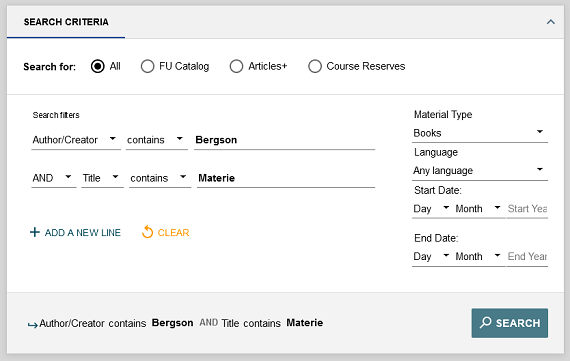
Compared to the simple search, the advanced search offers more options for more precise search. Predefined search fields allow you to search specifically for author, title, or ISBN, etc. The search fields can be linked using logical operators. You can also select the search scope: FU Catalog, Articles+ or Course Reserves.
- Example: Author: Bergson - AND - Title: Materie - Material Type: Books
- contains
default selection - contains (exact)
Corresponds to a phrase search phrase search
EXAMPLE for title: "to be or not to be"
EXAMPLE for author: "Thomas Mann"
Results that do not only contain this phrase, are also displayed. - begins with
The "begins with" function is only available for searches in "title" or "call number". It can be used to find very short journal titles more quickly, for example.
EXAMPLE: Spiegel [+ filter "material type": journal] - is (exact)
Select this setting in the title, author, or subject fields for a search in exact word sequence = phrase search. In contrast to "contains exactly," results that only contain the phrase are found. - Filters
The filters for material type, language and year of publication can be set on the right side of the search form.